
The safest wall colour for video calls isn’t always the plainest. There’s no single best shade: a calm, neutral or muted blue-green backdrop can look professional, as long as it doesn’t compete with you. A feature wall for video conference background should also contrast with your appearance, keeping you clearly in focus.
A tidy background helps keep attention on the meeting, but a blank wall isn’t your only option. Thoughtful colour, restrained styling and a well-composed custom design can give your workspace a polished look without overwhelming the frame.
Learn how to choose a suitable colour, arrange the space and use printed wall designs to create a distinctive, professional backdrop. You’ll also find practical camera and lighting adjustments to help the finished setting work on screen.
Key Takeaways
- Position the camera at or slightly above eye level, and place your main light in front of you to keep your face clear on screen.
- Use a restrained backdrop and remove distracting items so the meeting stays the focus.
- Arrange visible décor with care, keeping artwork level and objects from competing with your face.
- Consider a custom printed wall design when you want a distinctive background that reflects your organisation’s identity.
1. Choosing a professional video-call backdrop
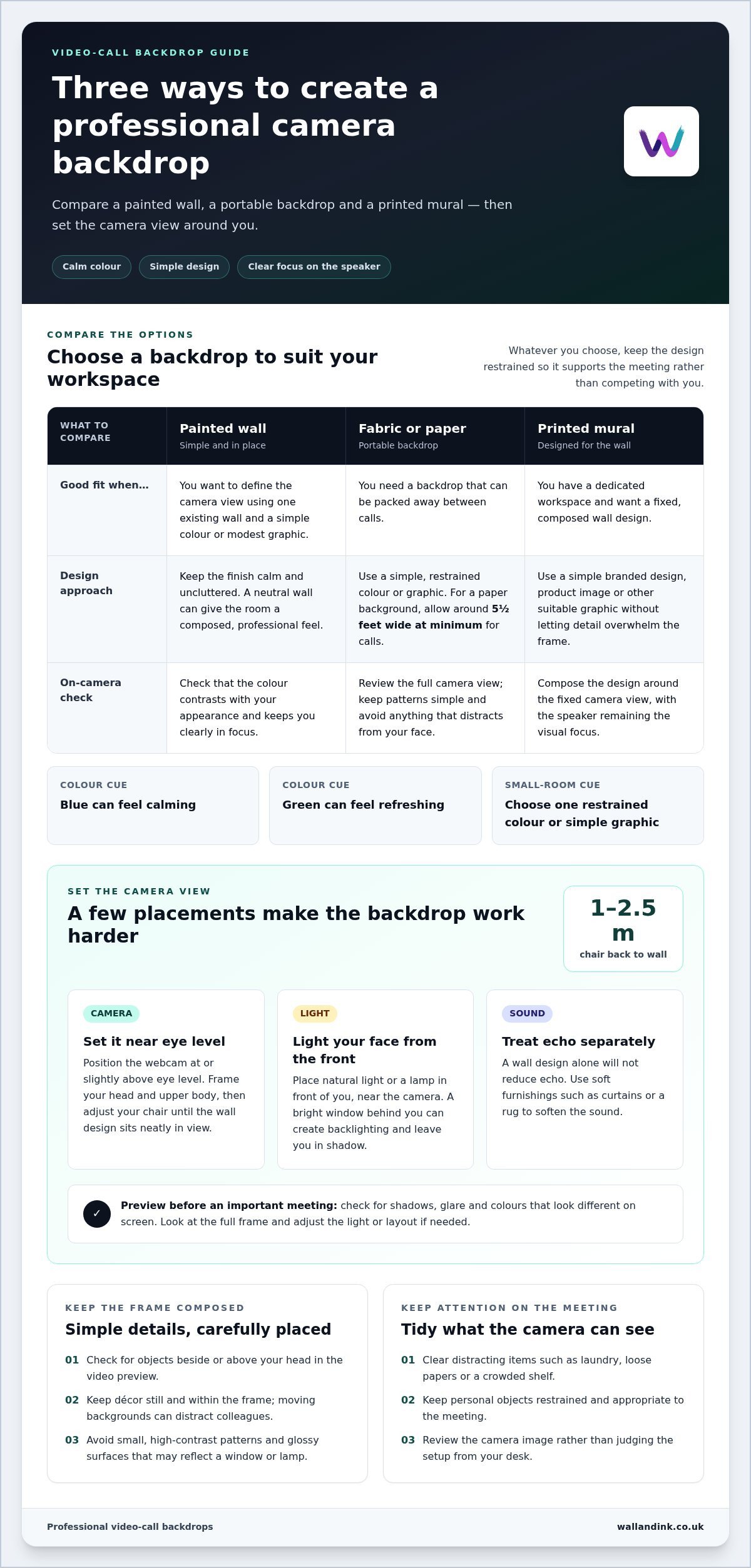
A professional video-call backdrop should support the meeting, not compete with the speaker. For a feature wall for video conference background, choose a calm colour or simple branded design, then check its appearance through the camera. Blue can feel calming, green refreshing, and muted tones help keep detailed imagery from overwhelming the frame.
To create an affordable feature wall, focus on one existing wall and keep the design simple: a painted colour, modest graphic or removable fabric backdrop can define the camera view. A paper background should be around five and a half feet wide at minimum for calls. Portable fabric or paper works well when you need to pack the backdrop away; a fixed mural suits a dedicated workspace.
Light your face and the wall separately. Place natural light or a lamp in front of you, near the camera, to illuminate your face. A bright window behind you can create backlighting and leave you in shadow. Set the webcam at or slightly above eye level, then adjust your chair until the wall design sits neatly in the frame.
For a home office, options include a painted wall, printed mural, or fabric or paper backdrop. In a small room, choose one restrained colour or simple graphic rather than a dense pattern, and keep the camera view to your head and upper body. A wall design alone won’t reduce echo. Soften sound with soft furnishings such as curtains or a rug, rather than relying on the wall image as acoustic treatment.
Match the design to workplace culture: a formal meeting room may suit a neutral finish with a discreet logo, while a creative team could use product imagery or a world map. UK design ideas can draw on muted colour and clean, brand-led graphics; custom wall-printing specialists can turn those choices into a fitted mural. Keep the artwork still, suitable for the meeting, and simple enough to leave the speaker in clear focus.
2. Treating a video-call background as a set
Stage the whole camera view, not just the wall. Sit in your usual position, open your video-call preview and look for objects beside or above your head. A plant, lamp or framed print can add depth, but keep each item still and within the frame. Moving backgrounds can distract colleagues, especially when you join a call on a mobile device.
How far should a desk and camera be from a feature wall? Keep the back of your chair about 1 to 2.5 metres from the wall. This creates visible depth while leaving room to frame your head and upper body; adjust the desk and camera until the arrangement looks balanced.
Preview the setup before an important meeting. Join the platform’s test call and check for shadows, glare and colours that look different on screen. Consider the window’s position at meeting time: changing daylight behind you can create backlighting. If the room looks shadowy, move your light source in front of you. Check the sound too, and adjust the microphone volume if your voice is difficult to hear.
How do wallpaper patterns and glossy finishes appear on camera? Small, high-contrast patterns can look busy on screen, while glossy surfaces may reflect a window or lamp. Choose a simple, matte-looking finish where possible, then review it through the camera before settling the layout.
For a permanent video-call space, keep the chair, camera and lighting in their working positions. Tidy cables, clear the desk and remove personal items that distract from the meeting. If you work from a bedroom, make the bed before calls; a few minutes of preparation can keep the background consistent. A purpose-planned wall design for video calls can also be composed around the camera’s fixed view.
3. Keeping a video background neutral and tidy
A clear background helps keep attention on the speaker and meeting. Before video calls, remove personal or distracting items from the camera’s view, such as laundry, loose papers or a crowded shelf. Keep the visual focus on your face and the discussion. A neutral wall colour works well when showing the real room, because it gives clients a calm setting without competing with the speaker.
Neutral doesn’t have to mean empty. Choose a couple of personal objects, such as a framed print and a small plant, as restrained conversation starters. Keep artwork appropriate to the meeting, with posters framed and level. If books sit behind you, select suitable titles, dust the visible spines and vary their heights to avoid a rigid row. Remove anything that looks untidy in the camera frame.
Where possible, position your chair with your back against a wall. This limits movement in the background when people walk through the room, keeping attention on the call. White and other neutral colours can make the space feel brighter, while natural light helps illuminate it. Account for changing daylight, and review the image on screen rather than judging the setup from your desk.
Virtual backgrounds need their own tidy check. Look at the outline of your chair: its back may blend into the digital image or appear distorted. A towel matching the virtual background’s colour can help disguise the chair, but check the result on camera before a client meeting. With a real-room backdrop, clear visible cables and clutter instead. A quick camera preview reveals distractions you may miss when looking directly at the room.
4. What makes a good feature wall for a video conference background?
A successful feature wall gives the camera a clear, composed backdrop while keeping you easy to see. Choose a colour that suits the room’s purpose: green can feel refreshing, while blue is generally calming. An accent colour can suggest energy and productivity, but avoid highly detailed designs that make the speaker harder to distinguish. Check the full camera frame, not just the wall, before settling on a layout.
Use the design to signal workplace identity without turning the meeting into an advertisement. A restrained company logo, brand colours or product-related imagery can make a wall distinctive and relevant. For podcasters, a recognisable branded background can reinforce their subject matter. In client meetings, choose imagery suited to the discussion and keep any wording large enough to read on screen without dominating the speaker.
Composition matters as much as colour. Keep vertical lines, such as door frames or wall panels, parallel in the camera view so the room doesn’t look askew. Arrange artwork or drapes to frame your face, rather than sit directly behind it. A plant or another natural object can make the setting feel warmer. For a tidy display, group decorative objects in threes; groups of five or seven can also work when shelf space allows.
Before committing to a design, sit in your usual call position and inspect the result on screen. Check whether the artwork suits different meeting types, from team updates to formal presentations. Avoid moving elements that could distract during a mobile call, and keep shelves clear enough to prevent visual clutter. A strong feature wall supports your message; it shouldn’t compete with it.
Ready to plan a custom wall design around your camera framing and workplace identity? Explore custom wall design options.
Wall & Ink: Direct-to-Wall Printing
Wall & Ink can turn a video-call backdrop into a custom wall design, using Direct-to-Wall Printing to apply artwork directly to the surface. It’s a practical option when a plain wall feels generic or a portable backdrop doesn’t suit a permanent workspace.
For an office, a Commercial Wall Mural can incorporate company colours, a logo or imagery linked to your work. Wall & Ink provides bespoke design consultations and digital visualisations to help you assess how the artwork fits the room and camera framing before installation. The same approach can shape Residential Wall Art for a home office.
Contact Wall & Ink to discuss a custom design for your video-call space.
Plan a backdrop that works beyond the screen
Your video-call wall can shape how a meeting room or home office feels between calls, too. Treat it as part of the room’s design, not just a camera setting. A feature wall for a video conference background should suit the space when the camera is off, as well as look clear and composed on screen.
To develop a design around your room and framing, Wall & Ink offers Direct-to-Wall Printing, Commercial Wall Murals and Residential Wall Art. These options can turn a considered colour palette, brand identity or selected imagery into a permanent wall design.
Before taking the next step, note where the camera sits, what appears in frame and which visual details matter to your work. That gives your design direction a practical starting point. Contact Wall & Ink about your wall to discuss a backdrop for your workspace.
Wall & Ink for a Video Conference Feature Wall
Wall & Ink offers Direct-to-Wall Printing and Commercial Wall Murals, making it a natural choice when you’re ready to turn a video conference background into a designed wall feature.
Explore Wall & Ink’s services for a workplace or another setting. Offerings also include Residential Wall Art, School and Educational Murals, Retail and Hospitality Graphics, and Exterior Wall Printing.
Frequently Asked Questions
Is there a best wall colour for video conferencing?
No single wall colour suits every person or room. Choose a shade that contrasts with your clothing, hair and skin tone, then compare options on camera. A colour that looks balanced in daylight may appear different under artificial lighting, so test the wall at your usual meeting time. If your clothes blend into the backdrop, change one colour rather than adding more decoration.
Which colours and patterns look best on video calls?
Muted colours and simple patterns tend to read clearly on screen. A soft blue wall or a restrained design with broad shapes, for example, can add character without filling the frame with detail. Tiny repeated patterns may look uneven through a webcam, so preview the design from your usual camera distance. Choose artwork that complements your clothing and suits the meeting’s tone.
What are the risks of distracting backgrounds on professional video calls?
A cluttered or highly detailed background can draw attention away from your face and the meeting. Personal papers, bright objects or movement behind you may also expose details you didn’t intend to share or interrupt the camera view. Before a client call, review the frame for anything identifiable, moving or visually dominant. Keep only items that support the conversation or reflect your professional setting.
What UK interior design trends and suppliers offer video call background ideas?
UK-inspired ideas include muted colours and clean, brand-led graphics. Wall & Ink offers direct-to-wall printing, bespoke design consultations and digital visualisations for custom murals.
How do I install removable wallpaper or acoustic panels on a feature wall?
Wall murals can be installed by following their directions and removed without damaging the wall. This article gives no installation guidance for acoustic panels; to soften sound, add soft furnishings such as curtains or a rug.