
A wall printer puts a prepared graphic directly onto a wall, without templates or foils. UV printing on walls uses ultraviolet ink, applied as the print head moves across the surface; modern wall printers can reach resolutions of up to 1440 dpi. The result depends not just on resolution, but also on the image file and the surface being printed.
Choosing artwork for UV printing on walls involves more than picking an image: a file that looks sharp on screen may lose detail at wall scale, and surfaces affect the finish. This guide explains how image formats and resolution influence print quality, which surfaces may suit the process, and how direct printing compares with wallpaper. It also covers how the printer works and how UV curing sets the ink, helping you plan the design and wall for your project.
Key Takeaways
- Understand how a wall printer transfers prepared artwork directly onto a surface, and how this differs from wallpaper and murals.
- Learn why image quality depends on the artwork file and the viewing distance, not resolution alone.
- See which surfaces can suit direct printing, including plaster, concrete, tiles, wood, glass and stone.
- Find out how UV curing and the wall’s condition affect preparation, print time and the finished result.
- Explore how direct wall printing can be used in homes, schools, retail spaces and other commercial settings.
Wall printer – what is it?
A wall printer applies a prepared graphic directly to a vertical surface. Its print head moves across the wall, placing ink point by point. Unlike wallpaper, the process needs no rolls, paste or panel joins. Unlike a hand-painted mural, the image comes from a digital file, making it possible to reproduce a photograph, brand graphic or custom artwork across a wall.
A listed UV wall printer uses five colours, identified as CMYKW: cyan, magenta, yellow, black and white. White ink supports artwork on darker surfaces and can be layered to create raised textures. The listed model has a 500 ml ink volume and supports 110/220/380 v voltage options. Its sensor or laser system helps position the print head on uneven surfaces, while computer controls let operators adjust scale and print settings during production.
The described vertical 3D printer is specified as 3M*6M and weighs 115 kg. Those details help illustrate the practical demands of the equipment: the work area needs space for the machine, access to the wall and room to position it safely. UV lamps cure the ink during printing. The described prints resist UV rays, moisture and abrasion, and retain colour intensity for 5-7 years.
Wall printing can suit plaster, concrete, tiles, wood, glass and other surfaces. The wall should be dry, clean and free from grease. Porous materials such as concrete may need priming because absorbency affects how the ink sits and appears. Cracks, loose coatings and heavy texture can also influence the image, so assess the wall’s condition as carefully as the graphic.
For work in the UK, permissions depend on the wall and the graphic’s location. Exterior printing may require landowner consent and checks for applicable planning, advertising or listed-building controls. Interior artwork has different considerations from an external advertisement.
There is no single purchase or hire cost for every UV wall printer. The amount depends on the machine format and print capability, transport, operator support and, for hire, the rental period. Businesses considering the investment should also factor in ink, maintenance, training and the space required to operate the equipment.
At home, a printed feature wall can display a personal photograph or bespoke design. In a workplace, a logo or wayfinding graphic can turn a wall into a display surface. Commercial uses include retail interiors, hospitality spaces and school murals, with artwork tailored to its setting. Direct printing is one way to create a wall mural: the mural is the artwork, while the printer is the application method.
Supported image formats and print resolution
A wall printer uses a prepared graphic file, but the file extension alone doesn’t determine print quality. Artwork can be raster, made from pixels, or vector, made from paths and shapes. Photographs are usually raster images, while simple logos can often be supplied as vector artwork. The printer’s control software must interpret the file correctly, so the production workflow matters as much as the original format. UV printing on walls uses digital artwork to create a physical image at wall scale.
There is no universal list of file extensions supported by every wall printer. Each machine and its software may have different input requirements. Start by considering the artwork itself: retain vector paths for clean-edged lettering and logos, and use the original, full-quality image for photographs. Avoid enlarging a small web image or screenshot, which may not contain enough detail for the finished wall dimensions.
Resolution describes how much image detail is reproduced across a given area. Print resolution varies by machine, and its maximum capability does not guarantee that every image will appear equally sharp. These are machine capabilities, not a guarantee that every image will appear equally sharp. The source image, its scale, fine details and intended viewing distance all affect the result. A detailed photograph viewed close up places different demands on artwork than a simple graphic seen across a room.
Set the artwork’s final proportions before production. A tall portrait enlarged to fill a wide wall, for example, may need cropping that removes important content. Check the composition against the wall shape, keep text and logos clear of the edges, and inspect fine lines at a realistic viewing size. Even a high-resolution file can look soft if the original image lacks detail. With UV printing on walls, enlarging the design can make flaws in the source more visible.
Resolution also has a practical relationship with production time. The described printers operate at 2-6 square metres per hour, while UV wall printing is stated to average 45-60 minutes per square metre, depending on complexity. These figures differ, so they shouldn’t be treated as interchangeable guarantees. A larger, detailed design can take longer than a simple graphic, and settings that prioritise detail can affect the production plan.
Before printing, prepare the file to the wall’s proportions and review its sharpness, crop and lettering. This gives the print head a clearly defined design to reproduce and helps prevent avoidable layout changes during production. For artwork intended for direct-to-wall printing, the original file and final wall dimensions are practical starting points for planning.
Direct printing compared with wallpaper
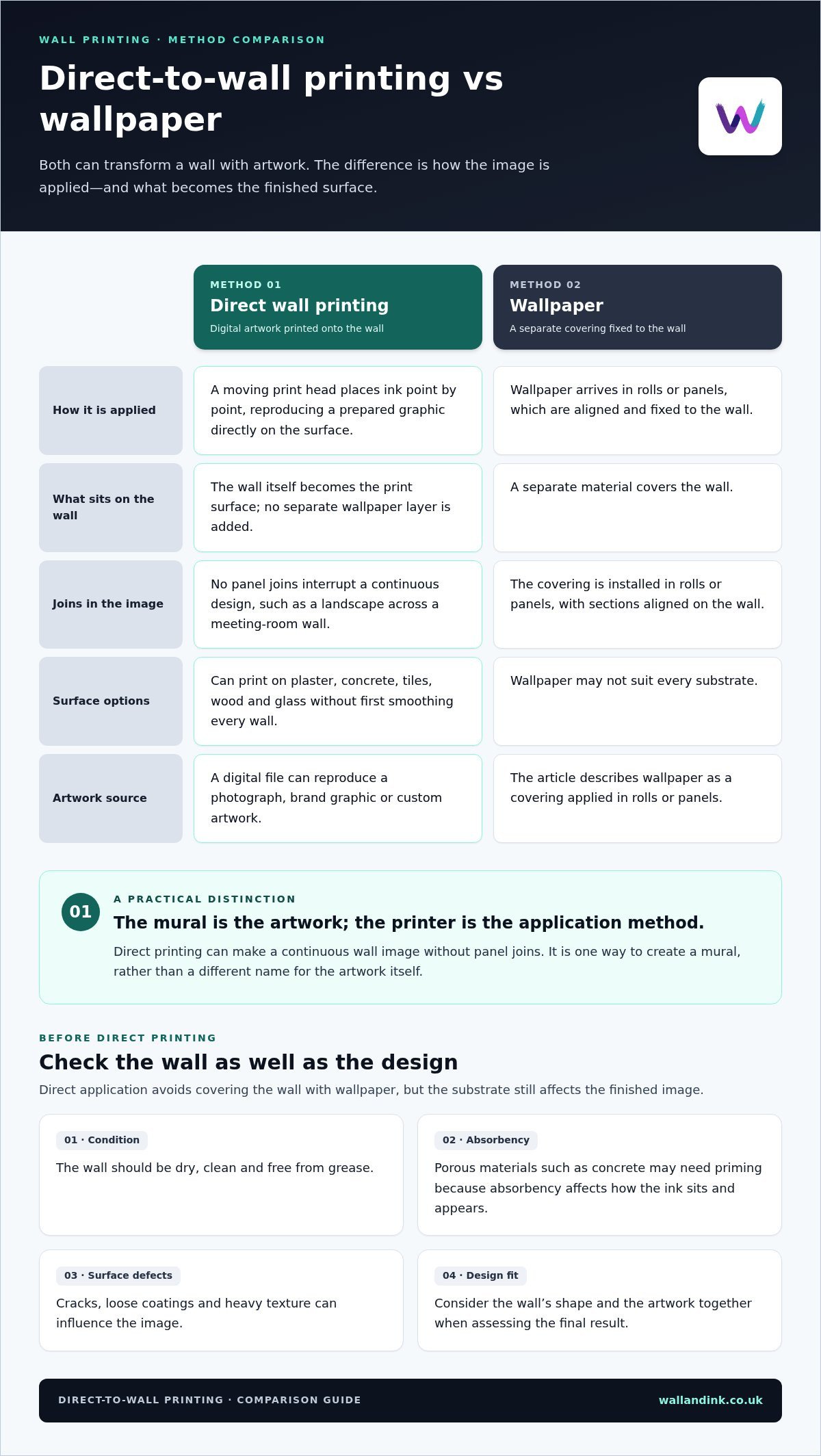
Wallpaper and direct wall printing create different finishes through different processes. Wallpaper arrives in rolls or panels that are aligned and fixed to the wall. A printer applies a prepared graphic directly to the surface, without templates or foils. This avoids panel joins interrupting a continuous image, such as a landscape across a meeting-room wall. The wall itself becomes the print surface rather than being covered with a separate material.
Wall printers can print onto plaster, concrete, tiles, wood and glass without first smoothing every wall. This makes the method versatile in spaces where wallpaper may not suit the substrate or where a design needs to sit on a hard surface. However, a printer’s capabilities do not guarantee a match for every wall. Surface condition and the materials supported by the equipment still affect the result.
A described 3D UV wall printer supports tiles, metal, wood, glass and stone. These materials behave differently from one another: a tiled surface has joints, whilst wood can have visible grain. A graphic crossing grout lines, for example, must account for those changes in the surface. Matching the artwork to the substrate helps preserve important edges and detail.
Preparation matters, even when direct printing avoids smoothing. The wall should be dry, clean and free from grease. Porous materials such as concrete may need priming to manage absorbency, which can affect how the ink sits on the surface. Loose coatings, dirt and uneven areas can also prevent a consistent print.
Wallpaper adds a physical layer between the design and the wall. Direct printing applies the image to the existing surface. That difference can shape the design: a tiled feature wall might suit a graphic printed across the tile area, while wallpaper can be supplied as repeated panels. Neither approach suits every setting. Choose according to the wall material, image layout and finish you want.
At home, direct printing can turn a plaster wall into a personalised feature; in a shop, a logo might use a glass or tiled area. Before production, compare the wall’s material and condition with the intended artwork. Dirty, damp or unprimed porous surfaces need preparation. A clean, suitable base helps the print look its best and lets the design work with the space and its texture.
Is UV printing suitable for small spaces?
Yes. A compact feature wall or single graphic can work in a small room because the image is printed directly onto the chosen surface. The practical constraint is the printer’s access, not just the wall area. It needs enough room for the print head to move across the design. For example, a narrow corridor needs clear working space beside the wall.
UV ink cures under ultraviolet light as the printer works. The described UV lamps cure ink within milliseconds, forming a permanent coating; the ink is also described as curing within 1 second. This rapid curing means the printed area dries during application, rather than needing a separate air-drying stage. In a small office, that helps keep the work area organised as the image is produced.
Fast curing doesn’t mean every wall graphic is finished quickly. Printing one design can take from a dozen or so minutes to several hours, depending on its size and complexity. The stated average is 45-60 minutes per square metre, while the listed printers operate at 2-6 square metres per hour. These figures describe different measures, so use the project’s area and detail to understand the schedule.
Preparation directly affects precision. Before printing, the wall should be dry, clean and free from grease. Porous surfaces such as concrete may need priming. In a small room, move furniture out of the work area so the machine can reach the wall. A clear layout also helps position the graphic around sockets, doors and shelving.
For a public art installation, the design and location need to work together. A school corridor mural, for example, may need to fit between doorways and remain legible to people passing through. A community venue might use a graphic on a prominent interior wall. Wall printing can also be used for indoor and outdoor advertising, so the surface and setting are central to planning.
When planning UV printing in enclosed settings such as meeting rooms and classrooms, consider the room’s conditions and access needs. The process still needs an accessible wall and a prepared surface; rapid curing does not remove those requirements. A durable finish depends on pairing suitable artwork and printer settings with proper preparation.
Small-scale printing can be practical when the graphic fits the wall and the machine can reach it. Plan the image dimensions, room access and wall preparation together. These factors influence how efficiently a UV wall print can be completed, whether it is a compact reception feature or a detailed public mural.
Residential and commercial applications
At home, a wall graphic can give a specific area a sense of purpose without adding objects. A landscape behind a dining table, for example, can create a focal point. A child’s bedroom might feature a custom illustration, while a hallway could display a family photograph. Plan the artwork around the room’s proportions, furniture and existing colour scheme.
Residential wall art can also suit spaces where standard-sized decorative pieces don’t fit. A long living-room wall can take a panoramic image, while a compact alcove might suit a smaller graphic. Direct printing puts the design on the chosen wall rather than adding wallpaper panels. It can create a continuous image across the available area when the composition is prepared for the wall’s shape.
Commercial interiors use wall graphics for more than decoration. In a reception area, a company logo can establish identity as visitors arrive. A retail display can use product imagery or campaign artwork to draw attention to a particular zone. In hospitality, graphics can support the character of a restaurant or hotel and visually distinguish dining, waiting and service areas.
In offices, graphics can reinforce branding across meeting rooms, shared workspaces and corridors. A map in reception, for instance, can show locations or communicate the organisation’s work. Schools can use educational murals to bring subject-related imagery into classrooms or communal areas. Match the design to its audience and purpose, and size lettering for the distance at which people will read it.
Commercial wall murals can fill a large visual area, but the artwork still needs a clear hierarchy. A logo, headline and supporting image compete when they all have equal emphasis. Decide what viewers should notice first, then arrange secondary details around it. This is especially useful in a shop window or entrance, where people may see the design only briefly.
Wall printing is also intended for indoor and outdoor advertising. An exterior graphic can give a building a prominent visual feature, whilst an interior design can shape the experience inside. UV wall prints are described as resistant to UV rays, moisture and abrasion, with colour intensity retained for 5-7 years. The setting and exposure still matter when planning placement and artwork.
Whether the project is a living-room feature or a branded commercial wall, start with the wall’s role in the space. Define the audience, viewing distance and key message before selecting imagery. For residential projects, explore custom wall art options; for business interiors, align the mural with the brand and the way people move through the space.
Wall & Ink: Direct-to-Wall Printing
Wall & Ink provides Direct-to-Wall Printing for bespoke graphics applied directly to a wall. It suits artwork tailored to a particular surface rather than a standard-sized image. Businesses can use Commercial Wall Murals to bring brand graphics into customer-facing spaces. At home, Residential Wall Art can turn a chosen wall into a focal point. Schools can add custom imagery to learning environments with School and Educational Murals.
When planning a project, share the wall dimensions, surface material and intended design. These details help shape artwork that fits the space and its purpose. Wall & Ink brings the design and on-site application together through direct wall printing.
Visit wallandink.co.uk to discuss your wall printing project with Wall & Ink.
Turn your wall into a considered design choice
Treat the wall as part of the project from the outset, rather than as a blank background to fill later. Decide what the space should communicate, then shape the artwork around its use, scale and audience. This makes UV printing on walls a purposeful design decision, whether you want a focal point at home or a clearer identity in a commercial setting.
Wall & Ink offers Direct-to-Wall Printing, Commercial Wall Murals and Residential Wall Art. These services bring custom artwork directly to the wall, supporting projects that need a design tailored to a particular space. At home, that could mean artwork that reflects a room’s character. For a business, it could mean integrating a visual identity into the interior.
Bring your wall, artwork idea and intended setting together as you plan what comes next. Contact Wall & Ink about your wall to discuss your project and take the next step towards a design made for your space.
Wall & Ink for UV Printing on Walls
Wall & Ink offers Direct-to-Wall Printing for projects involving UV printing on walls. Services include Commercial Wall Murals, Residential Wall Art, School and Educational Murals, Retail and Hospitality Graphics, and Exterior Wall Printing.
Turn to Wall & Ink when you’re ready to plan a wall-printing project for a home, school, business, retail or hospitality space, or exterior wall.
Frequently Asked Questions
How does the UV printer for walls work?
A wall printer moves its print head across the surface, applying ink point by point from a prepared digital graphic. Computer controls position and scale the image, while sensors or lasers help align the head with the wall. For example, a logo can be positioned to avoid a doorway or switch. UV light cures the ink as printing progresses, forming the image directly on the wall.
What surfaces can be used for UV printing?
UV printing can be used on plaster, brick, concrete, painted walls, wood, tile and glass. Material alone does not determine suitability: surface condition, texture and porosity affect the result. Porous concrete may need priming, while uneven grout can interrupt a design that crosses tiles. A smooth, clean wall provides a more consistent base. Exterior surfaces can also be printed, with exposure and substrate considered during project planning.
How does UV wall printing work?
The graphic is prepared digitally, then the printer applies UV-curable ink directly to the wall. Ultraviolet light cures the ink during printing instead of leaving a wet image to air-dry. White ink can support designs on darker backgrounds, and layering it can create raised texture. This makes UV wall printing suitable for images that need colour, contrast or tactile detail on the finished surface.
What preparation is needed before printing on a wall?
Prepare the wall and work area before positioning the printer. The surface should be dry, clean and free from grease; porous areas such as concrete may need priming. Move furniture and loose items away from the wall, and consider fixtures that could interrupt the design. Match the final artwork proportions to the available wall area so important text and image details do not fall across an edge or obstruction.
How long does UV wall printing take for a typical room or mural?
Time depends on the printed area and design complexity, so a room’s wall dimensions are more useful than the room label alone. UV printing is stated to average 45-60 minutes per square metre, while described printers operate at 2-6 square metres per hour. These are different measures, not interchangeable promises. Fine detail, colour coverage and the layout can all affect the production schedule.
What are the advantages and disadvantages of UV wall printing compared with wallpaper, vinyl and hand-painted murals?
Direct printing creates a continuous image on the wall without wallpaper panel joins and reproduces digital artwork consistently. Wallpaper is a separate covering, while hand-painted murals are created by an artist on site. Vinyl uses applied graphics rather than ink printed directly onto the surface. Direct printing requires suitable wall access and preparation, and the final image depends on the supplied artwork and the wall’s condition.
Are UV inks safe indoors, and what ventilation is needed?
Wall & Ink’s UV-cured inks are odourless and suitable for indoor use, including nurseries, schools and healthcare settings. Odourless ink does not mean a room should be sealed during printing. Ventilation needs depend on the room’s airflow and printer setup; keep the space ventilated and follow the equipment’s operating instructions. UV curing describes how the ink sets, while ventilation concerns the working environment.
What wall printing restrictions, permissions or building regulations apply in the UK?
Exterior wall printing may require landowner consent and checks for applicable planning, advertising or listed-building controls. Interior artwork has different considerations from an external advertisement.